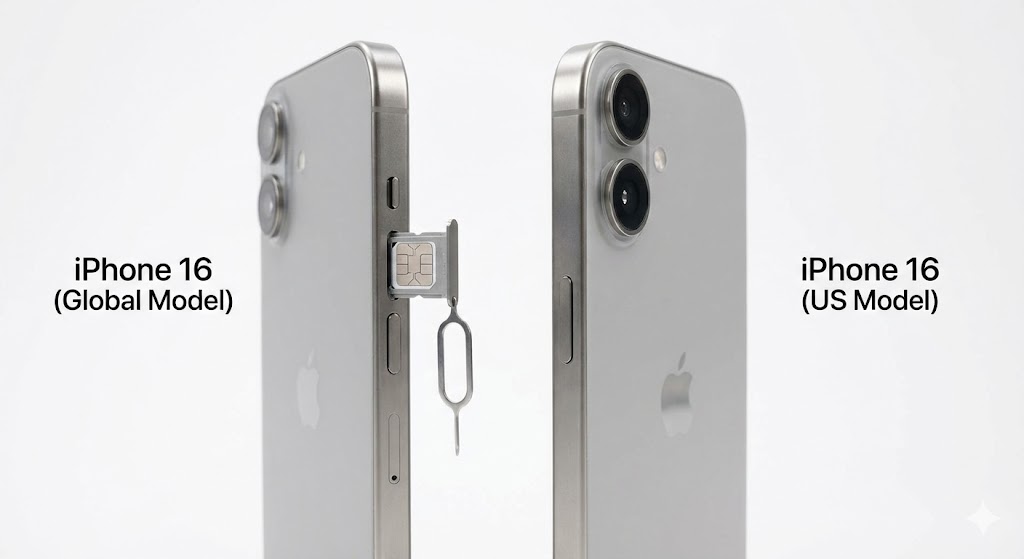
You just unboxed your shiny new iPhone 16, looked at the side, and froze. Where is the SIM card tray?
Before you panic and think you received a defective unit, here is the short answer: If you bought your iPhone 16 in the United States, it does NOT have a physical SIM slot. It is eSIM only.
However, if you bought it in Europe, Asia, or almost anywhere else, the slot is still there. In this guide, we explain exactly what this means for your travels and how to adapt to the “eSIM-only” future.
Quick Answer: Does My iPhone 16 Have a SIM Tray?
| Region Purchased | Physical SIM Slot? | eSIM Support? |
|---|---|---|
| 🇺🇸 United States | ❌ NO | ✅ Dual eSIM |
| 🇨🇦 Canada / Mexico | ✅ YES | ✅ Dual eSIM |
| 🇪🇺 Europe / UK | ✅ YES | ✅ Dual eSIM |
| 🇨🇳 China / Hong Kong | ✅ YES (Dual Physical) | ❌ No (Mostly) |
Why Did Apple Remove the SIM Slot?
Apple removed the tray from US models starting with the iPhone 14, and they have continued this trend with the iPhone 15 and 16 lines. Why? Two reasons:
- Space: Removing the tray frees up valuable space inside the phone for larger batteries and better Taptic Engines.
- Water Resistance: One less hole in the frame means better protection against water and dust.
The Problem for Travelers
If you have a US-model iPhone 16, you can no longer land in London or Tokyo and buy a cheap physical SIM card at a kiosk. You literally cannot put it in your phone.
The Solution? You MUST use travel eSIMs.
Fortunately, this is actually easier and often cheaper. Apps like Airalo and Holafly allow you to download a data plan instantly. You don’t need a paperclip, and you don’t need to risk losing your tiny home SIM card.
How to “Transfer” Your Number to iPhone 16
If you are upgrading from an older iPhone (like an iPhone 11 or 12) that used a physical card, you might be confused about how to move your number.
Option 1: The “Quick Transfer” (During Setup)
When you turn on your new iPhone 16 and place it next to your old one, iOS will ask if you want to transfer your number. It will automatically convert your old physical SIM into a digital eSIM on the new phone. This works for major carriers like AT&T, T-Mobile, and Verizon.
Option 2: Carrier QR Code
If the automatic transfer fails, contact your carrier. They will email you a QR code. Go to Settings > Cellular > Add eSIM and scan it.
Best eSIMs for Your New iPhone 16
Since your phone is designed for eSIMs, you should take advantage of the technology. Here are the top apps we recommend installing immediately:
- For Budget Travel: Airalo (Cheap data packages worldwide).
- For Unlimited Data: Holafly (Great for heavy users).
- For Free Testing: eSIMFree (Try the tech for free).
Final Thoughts
Don’t be afraid of the missing slot. The eSIM-only iPhone 16 is safer (thieves can’t remove your SIM to kill the signal) and more convenient for travel. Welcome to the future!
Got your new iPhone ready? Check out the Best eSIM for Turkey for your next trip.